Articles in this topic
Privacy check and View as
See your party website the way a stranger and a signed-in guest see it, and let the Privacy check list and fix everything a visitor can see that should be for your guests.
4 min read
Party and event websites only.
A link to your website can end up with people you did not invite. These two tools show you what they see.
View as: visitor or guest
Above the preview, next to the round refresh arrow, View as has three choices:
- Editing view — everything on every page, as you edit it.
- Visitor — the draft as a visitor who is not signed in sees it: pages and sections for guests are gone, the menu is short, a page for guests shows the sign-in page.
- Guest — the draft as a signed-in guest sees it, with a made-up guest ("Hi, Ana").
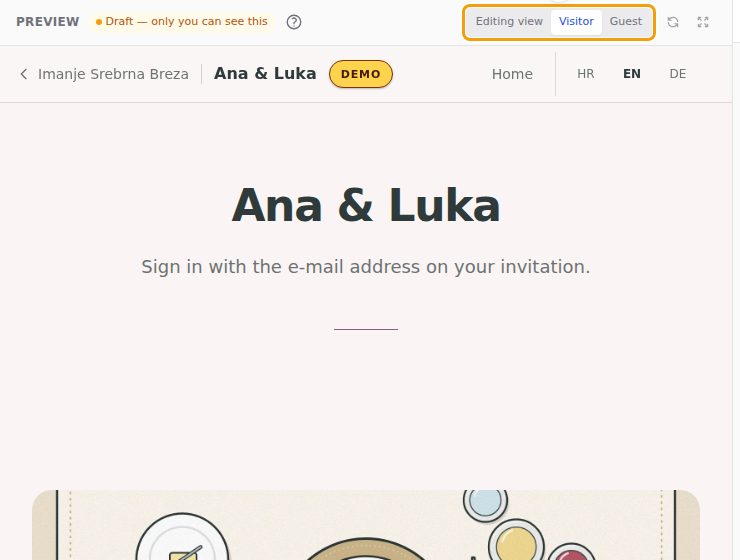
Your choice is remembered on this computer. The Visitor and Guest views follow exactly the rules of the published website, so use them before you publish.
Tip
The editors that swap a single section into the preview do that only in the editing view. In the other two views the preview reloads after every change.
The Privacy check
When your published website shows a stranger something that is not safe for everyone, a yellow bar appears above the editor: N things are visible to anyone with the link. Safe for everyone are the hero, the countdown, dividers and the sign-in; everything else — the story, the programme, the gift list, the menu, the address — is listed.
The bar has three buttons:
-
Review — the list: the page and the section, one line each.

The list of what a stranger can see (1) -
Preview as visitor — opens the preview in the Visitor view.
-
Make guest-only and publish — asks you to confirm, then makes those sections (and the pages that would be left with nothing) for signed-in guests only, and publishes that change right away. Your other unpublished edits stay in the draft; they are not published. The change is in the version history as a Privacy fix.

The yellow bar: Review (1), Preview as visitor (2) and Make guest-only and publish (3)
If you want a section to stay public, leave the bar alone and keep the section as it is — or, better, move what is private into its own section and set that one to guests only.
Good to know
The check cannot read your texts, so it lists every section a visitor can see except the safe types. A line in the list is not an accusation: it is a reason to look at it with Preview as visitor.
Venue staff see the same bar when they open the party in the Party Manager, and the party list shows how many public sections each wedding has, so the venue can ask the couple to look.