Articles in this topic
The organiser
Give the person who runs a series an account of their own — how to assign them, how their sign-in link works, what they can do and what stays with your venue, and how to enter a meetup's tools and come back.
7 min read
The organiser is the person your venue puts in charge of a series. They do not need a Clava account: they get a sign-in link by email, and it opens an area where they see only this series. That area shows the same series pages that you use under the Series entry in the sidebar.
Assign an organiser
You can add an organiser when you create the series (Organiser in the form) or later. Open the series and look at the Organiser card on the Overview tab:
- Add organiser asks for the Name, the Email and, optionally, the Phone. Tick Email the sign-in link now if the organiser should get their link at once; it is off until you tick it, and you can send the link later.
- Change gives the series to another person. The earlier person's sign-in links stop working at once. If you only change their phone or name and keep the same email, their links keep working.
- Remove asks first. The links stop working at once and your venue becomes the contact of the series again. Members and meetups are not changed.
The sign-in link
The link in the email opens the organiser's area. Their sign-in lasts 30 days, so an organiser who works on the series regularly does not have to sign in again. The link is personal: do not forward it.
Click Send link again on the Organiser card to email a new link to the organiser; older links keep working until they expire. An organiser whose link has expired can ask for a new one on the page that says the link has expired, and it goes to the email address of the organiser.
What the organiser sees
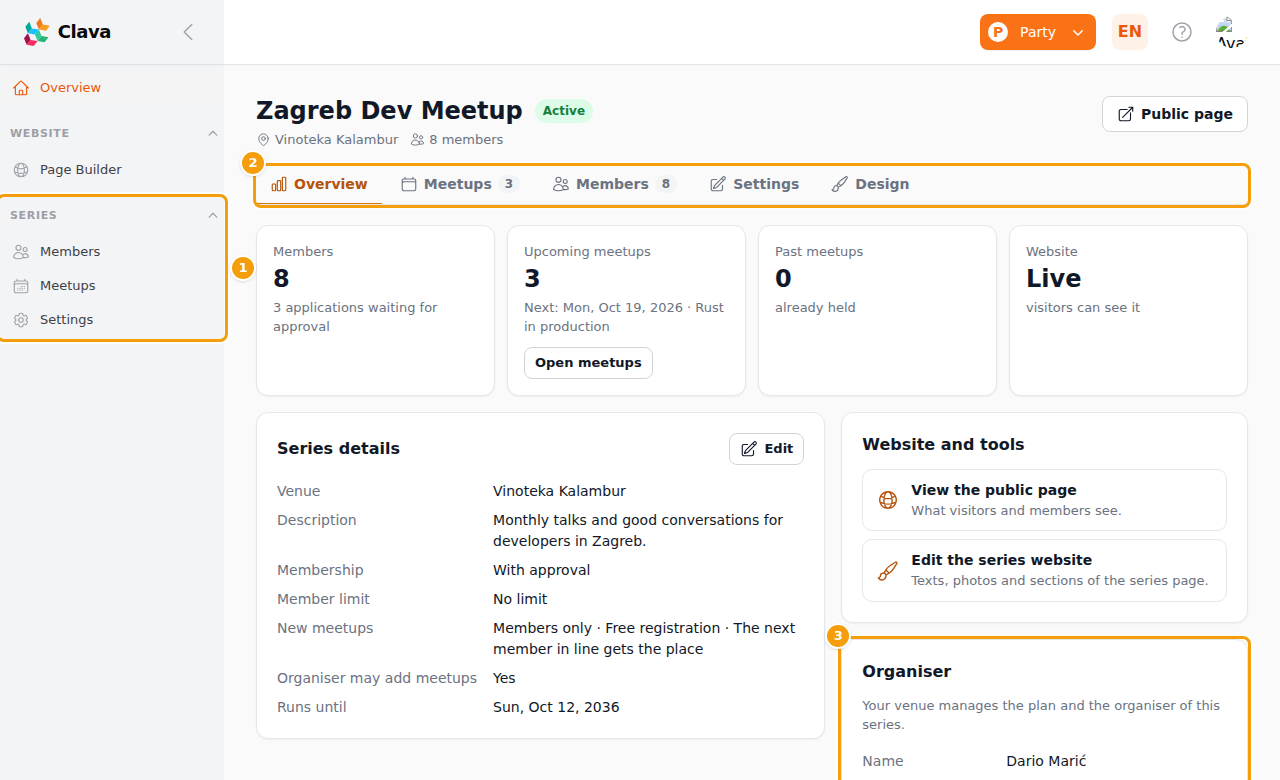
The menu has Overview and, under Series, Members, Meetups and Settings; Page Builder is the editor of the series website. The page itself is the one you know: the tabs (2) Overview, Meetups, Members, Settings and Design, with the series name on top. The organiser can:
- look after the members: approve and decline applications, invite, import, ban, and read profiles — see Members;
- create and change meetups, tickets, attendees, check-in and the waiting list, and announce a meetup to the members — see Meetups of a series;
- edit the series website and give all meetups its design — see The series website and its design;
- change who can join and what a new meetup starts with, and the profile questions, on Settings;
- hire a room of your venue for a meetup, where you have allowed it — see Hiring rooms to a series organiser.
The "?" in the top bar of the organiser's area opens this article.
What stays with your venue
On the Organiser card (3) the organiser reads Your venue manages the plan and the organiser of this series. They cannot:
- archive or restore the series, or change its name, venue, member limit and end date;
- change or remove the organiser, or your plan;
- add meetups when you have switched off The organiser may add meetups. They read that your venue has not allowed new meetups for the series right now;
- choose which rooms of the venue may be hired and at what price: that stays with you — see Hiring rooms to a series organiser;
- see anything of a client party, another series or your other events.
The series itself has no guest list, seating plan or shop of its own, so those pages are not offered in the organiser's area.
Good to know
When your plan no longer includes event series (or you switch event series off for the brand or the location), the organiser can still open the area and look at everything, but cannot change anything. Winding the series down — archive it, remove the organiser, decline or remove members — stays with you. See Event series at a glance.
Open the tools of a meetup
Each meetup has the usual organiser tools of an event. In the organiser's area open a meetup on the Meetups tab and click Open this meetup's tools (Seating plan, shop, questions and the website of this meetup). The area then works on that meetup, and a button Back to the series at the top returns to the series. A meetup session lasts an hour at a time.
Open the organiser's area yourself
On the Overview tab, Website and tools has Organiser tools. It opens the organiser's area as the organiser sees it, for checking or for helping them. Such a session runs an hour at a time, and read-only colleagues cannot change anything in it.